

Your State After Reading This Article
- You understand what
Composition Patternis. - You understand why
Composition Patternis a core development principle in React. - You understand how
Composition Patternis utilized in React.
Introduction
When studying certain knowledge, it would be nice if it clicked from the beginning, but it often clicks belatedly.
For me, Composition pattern was such a case.
As a core concept of composition used in React, I've frequently encountered it and used it daily through function-based React, but it didn't quite resonate with me.
While working on a project and implementing several components directly, the meaning of this concept finally clicked 💡!
Let me organize the concepts I've understood.
What is Composition Pattern?
Composition Pattern is also called the Composite Pattern.
It is a type of Design pattern related to Object-Oriented Programming (OOP), where Composite objects and Leaf objects are treated as the same Component, allowing clients to use both through the same interface without distinguishing between them.
It would be easier to understand by looking at an example first rather than an explanation.
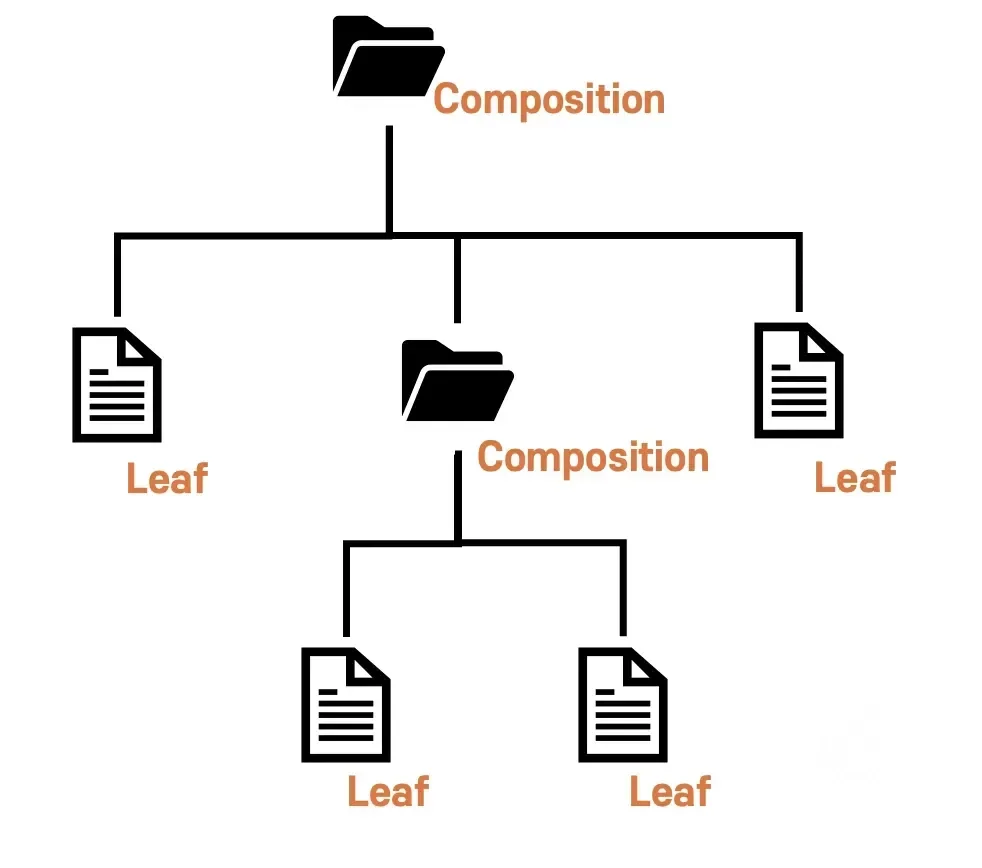
When talking about the composition pattern, file system structure is commonly given as an example.
Both files and directories can typically be used through double-click or open.
The two differ only in their targets; from the user's perspective, they perform the same action.
This is exactly what the composition pattern is.
Here, the composite pattern aims to manipulate files and directories through the same interface.
It has the characteristics shown above. If you look closely at the diagram above, you can see that Component and Composition(Directory) have a many:1 relationship.
To summarize:
- Component: As an Interface, it binds Leaf and Component together and defines the common actions they must perform
- Composition: Composite object, responsible for storing and managing Leaf and Composition internally
- Manages Component implementations (Leaf, Composition) internally as lists or objects
- add / remove functions perform the role of storing or deleting single component implementations internally
- When operate is executed, it iterates through the internal list and executes each object's operate
- Leaf: Single object, responsible for simply displaying content like a file
- The Component's interface operate returns an appropriate value when executed in Leaf
The key is to define an abstract method called Component, and in Composition, receive implementations of this as an array and manage them recursively.
This is a brief summary, but there's a more detailed article on this topic, so if you need additional learning, check out the article below.
Composite Pattern - Complete Mastery
Representative Usage Examples of Composition Components
Earlier, we understood what the composition pattern is.
Now what we need to discuss is how it is actually utilized in frontend development.
I want to go into more detail about how it's utilized in modern React.
React has become an indispensable part of recent frontend trends, so... let's take a look.
React and Composition Components
React was actually designed and implemented to enable the construction of complex UI/UX through component composition.
Evidence for this can be easily found, as shown below.
This is React's official documentation, and you can see that it recommends composition from the start.
This is a relatively recent document, and you can see that the tutorial is conducted based on the composition component approach.
Specific Cases
Now that we know the composition component pattern is used in React, let's look at more specific elements.
As one of React's design and development philosophies, there are really many cases, but there seem to be 4 cases that make it easy to understand.
- Render Props
- Children Props
- Higher-Order Components (HOC)
- Compound Components
I want to talk about #1 in relation to class syntax, and #2, #3, #4 based on function syntax.
1. Render Props
Render Props is a pattern that allows a component to control its rendering content through a function-type prop.
This allows logic to be shared between components, and an example is shown below.
This shows the DataFetcher component encapsulating the data fetching logic using the Render Props pattern.
As you can see here, this is a method that allows the parent to define the rendering approach.
For those who might be unfamiliar with class syntax, in React's class syntax, render() plays the same role as return in function.
So looking at the structure above, it receives as an argument and adopts a method of putting it into render() to render.
In other words, you can think of component's operate() as render().
And if you want to use the above technique in a functional component, you can similarly create and pass a component to props.
I'll talk about this in #2.
2. Children Props
React components can include other components through the children prop.
If you've worked with React, this is a method you've used a lot, allowing parent components to compose child components to build complex UIs.
In this example, the Card component includes CardHeader and CardBody components to form a single card UI.
This allows each part to be independently reused and managed.
Actually, this isn't much different from #1 when you think about it. It's just expressed as {children} through destructuring, but originally it can be expressed and used as props.children.
3. Higher-Order Components (HOC)
HOC is a function that takes a component as an argument and returns a new component.
Also called a Higher-Order Component, this method comes from JavaScript's higher-order functions.
Higher-order functions are a fundamental principle of JavaScript, so... I'll cover this separately later.
Anyway, through HOC, you can extend a component's functionality or reuse common logic.
The usage example is as above.
Using HOC, you can add logging functionality while maintaining the Button component's functionality, and you can apply the same HOC to other components as well.
Another example of this application technique is error handling.
4. Compound Components
The Compound Components pattern is a method of composing multiple related components to form a single composite component.
This allows for a more intuitive and declarative API.
In this example, the Tabs component receives multiple Tab components as children, managing and rendering the active tab.
This makes it easy to construct a tab UI.
The advantages of using the composition pattern like this are as follows:
- Improved Reusability: Components can be designed independently and reused in various situations.
- Increased Flexibility: Various UIs can be dynamically composed through component composition methods.
- Easy Maintenance: Since each component operates independently, modification and extension become easier.
- Improved Readability: Component roles are clearly separated, increasing code readability.
However, it's not all good. The following precautions exist:
- Avoid Over-Abstraction: Overusing the composition pattern can make the component hierarchy overly complex. It's important to use composition at an appropriate level.
- Clear API Design: The interaction between components must be clear. Especially when using Compound Components, the interface between parent and child must be clearly defined.
- Performance Consideration: When using the composition pattern, optimization may be needed to prevent unnecessary re-renders. Performance can be optimized using
React.memooruseCallback.
Conclusion
So far, we've understood what Composition Pattern is and how it's applied in React.
Besides the 4 cases introduced earlier, this pattern is used really frequently.
Going a bit deeper, thinking about what other problems this pattern can be applied to besides what was introduced might lead to additional growth beyond this article.