

Message I Want to Convey Through This Article
- It's extremely important to use React Developer Tools well.
- Using
useCallback,useMemo, andReact.memocan optimize React rendering. - However, when using these, judgment about when to use them is important.
- Really, really, judgment about when to use them is extremely important.
- If used incorrectly, it can actually degrade performance.
Motivation for Writing
Am I a good developer?
As a frontend developer, am I considering users?
It's been almost a year since I transitioned to frontend development. I thought I had learned a lot through experiences like Boostcamp.
While doing my 2024 retrospective, looking back at myself, I was rushing to 'implement' without considering anything beyond that.
Now that I can implement things to some extent, I needed to approach from the perspective of delivering value to users beyond just exploring React's principles.
Hanghae Plus Frontend Cohort 4
In addition to the reasons mentioned above, I applied for Hanghae Plus to achieve deep practical growth.
Hanghae Plus provides various courses for growth as a frontend developer.
Initially, it covers React and JavaScript in depth, and in that process, I encountered situations where I could experience refactoring and performance optimization.
I decided to write this article with the thought of truly experiencing it firsthand and creating my own words about performance optimization.
Problem Situation

This is the initially given code and directory structure.
You can check the logic I processed at my GitHub where I completed the Hanghae Plus assignment.
Current Code Structure
The current code structure can be summarized as follows:
Ideas for Optimization
There are 2 optimizations I will approach in the current code.
- Modularize the code
- Optimize related logic
For optimization, I want to think about ways to optimize components using useMemo, useCallback, React.memo, etc.
Code Modularization
Before optimizing code, we need to improve readability.
Separating Type Declarations
In the current code, type declarations are mixed with component code.
Since types are used in both components and context, they needed to be separated externally.
For this project only, I'm doing refactoring, and since it's used in all components in the project, I created a folder called types in src and separated it by naming it types.ts.

Separating Hooks
In the current code, there's a custom hook called useAppContext.
This hook is commonly used in components like Header.
Accordingly, I created a hooks folder in src and separated it as useAppContext.ts.

Separating Components
Looking at the App.tsx code, Header, ItemList, ComplexForm, and NotificationSystem all exist inside the App component.
To separate these, I created a components folder and separated them as Header.tsx, ItemList.tsx, ComplexForm.tsx, and NotificationSystem.tsx.

There are still items to improve, but the major flow has been separated.
Creating Barrel Files
A barrel file is a file that allows importing exports from multiple modules using a single import statement.
Prior to structural improvement, I created index.ts files to reduce import, export statements and added them to components, hooks, and types folders.
And accordingly, we also modify the import / export statements.
You can see it's become much cleaner.
Performance Optimization
Now that we've primarily modularized the code, we'll proceed with optimization based on this.
The optimization methods we'll use are as follows:
- Function optimization using
useCallback - Value optimization using
useMemo - Component optimization using
React.memo
What Criteria Should We Use for Optimization?
As someone just starting to learn optimization, I don't have clear criteria.
Nevertheless, the elements I can think of when looking at the code are as follows:
- Preventing unnecessary rendering
- Preventing unnecessary resource waste during the rendering process
In other words, we can think about optimization based on rendering itself and what happens during rendering.
Preventing Unnecessary Function Creation During Rendering with useCallback
Since we've already analyzed the code structure earlier, I want to approach it from a code perspective first.
Before that, let's find out when to use useCallback.
What is useCallback?
useCallbackis a hook that memoizes functions.
Memoization stores previously calculated values so that the same calculations are not repeated.
>useCallbackmemoizes functions so that new functions are not created on every render.
Just looking at this, you might wonder why this is necessary.
To understand this, the concept you need to understand is "function equality".
Function Equality
In JavaScript, functions are treated as objects. Therefore, functions have reference values.
Just as two objects are treated as different objects if they have different memory addresses even if they have the same values,
Functions are also treated as different functions if they have different memory addresses even if they have the same logic.
When passing a specific function as an argument to another function or as props to a child component, unexpected problems can occur because the function references are different.
In the code above, you can see the problem that occurs due to function equality.
useCallback is used to solve this problem.
Applying useCallback to Code
In App.tsx, there are login, logout, addNotification, and removeNotification functions.
These functions are used in useAppContext, and these functions create new functions every time the App component renders.
To prevent this, we can use useCallback to memoize functions.
At this time, since the login and logout functions use the addNotification function, we need to add the addNotification function to the dependency array.
Return Value Optimization
useMemo is a hook that memoizes the value returned by a function.
Since we've optimized functions, now it's time to use useMemo to optimize the values returned by functions.
Usually useMemo is used for functions with heavy computation or values that need to be calculated on every render.
Based on this, let's use useMemo to optimize values that are unnecessarily computed every time despite complex operations.
Applying useMemo to App.tsx
In App.tsx, contextValue is provided.
Since the context value object is created as a new object on every render, we can use useMemo to optimize it.
Applying useMemo to ItemList.tsx
In the ItemList component, there are filteredItems, totalPrice, and averagePrice values.
Since these values are calculated on every render, we can use useMemo to optimize them.
Applying React.memo
React.memo is a higher-order component (HOC) that memoizes functional components to prevent unnecessary re-renders.
When a component is re-rendered with the same props, it can optimize performance by reusing previously rendered results.
It's especially useful when components perform heavy computations or have a high chance of being re-rendered frequently.
The application method is simple. Just wrap the functional component with React.memo.
Just wrap it as shown above.
Since App.tsx is the root, we wrap everything except it.
Rendering Optimization
Now that we've optimized functions and values, we'll proceed with rendering optimization through using React.memo and modifying component structure.
We'll use the React Developer Tools we learned in Exploring React Developer Tools.
Additional Problems Identified Through Developer Tools

When an event is triggered, all components on the screen are being rendered.
Identifying Problems Based on Context
The biggest reason for full re-rendering in the current structure is that all state and functions are provided as a single context in AppContext.
Every time the context value changes, all context consumers are re-rendered.
This is due to the basic behavior of React's Context API, which re-renders all components subscribing to that context when the context value changes.
This causes unnecessary component re-renders when changing theme or user authentication state.
Context Separation
To solve this, we need to separate AppContext into multiple contexts so that only components subscribing to that context are re-rendered when the context value changes.
To separate AppContext, let's divide it into ThemeContext, UserContext, and NotificationContext.
We create a contexts folder and modularize each of them.
For readability, I wrote them in a single file, but in reality, I separated them into different files.
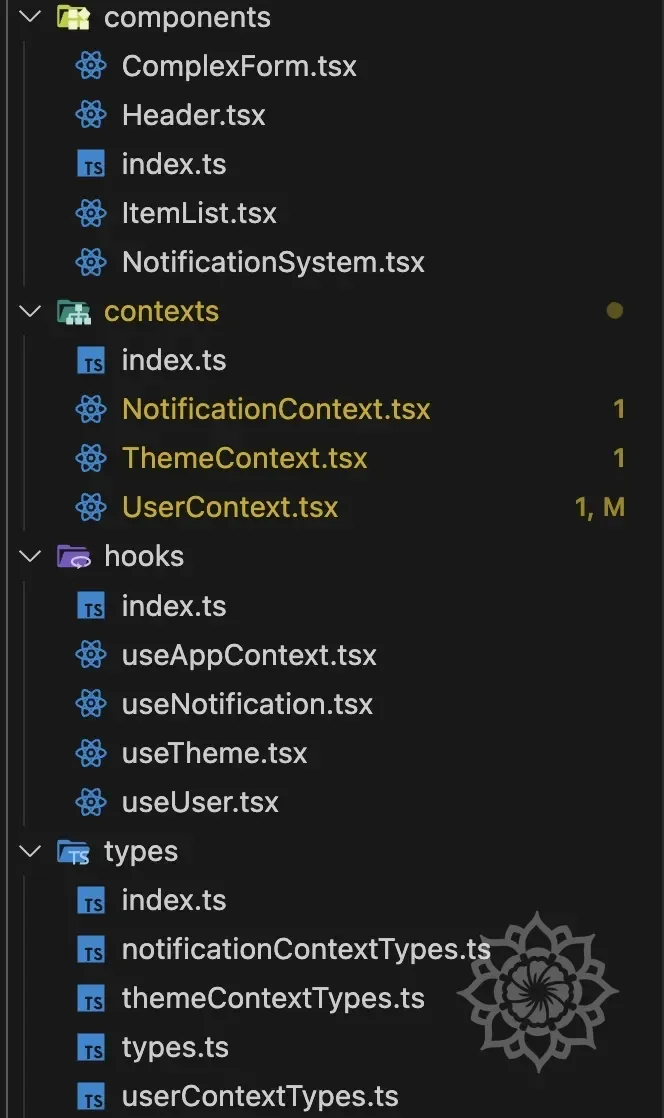
Then, apply the separated contexts to each component.
Results
As a result of optimization, we can confirm that re-renders have decreased.
It doesn't seem like there's much difference in rendering, but actually only the container is being re-rendered, and overall rendering itself has decreased significantly.
What was rendering everything is now rendering only partially.

The performance measurement itself was based on dark mode / light mode switching.
As you can see in the right panel, after optimization, Render duration decreased from 21.8ms to 11.6ms.
Reflection
As I learned during the education, actually optimization through useCallback, useMemo, React.memo can have minimal effects for simple code.
In fact, in this result, you can see that the difference is very minimal.
Depending on which function is executed, rendering time actually took longer because there were many additional modules to execute even for simple functions.
It's better to optimize only where it's needed.
useCallback,useMemo,React.memocan improve performance if used well, but can degrade performance if used incorrectly.
I didn't really understand the meaning of these words... but I was able to feel it by doing it myself this time.
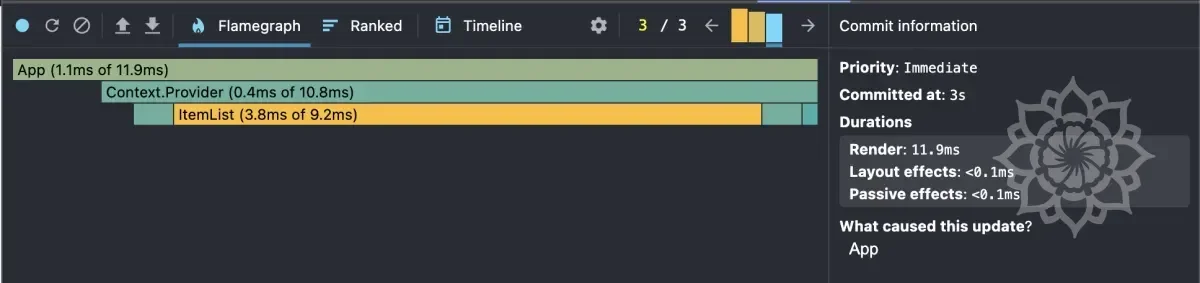
This is when the login button was pressed, and you can see that the performance after optimization is actually worse.
Conclusion: What to Do Going Forward?
Now that I've properly used it and learned, going forward I want to think about 'when' to optimize.
I need to continue studying optimization techniques, but more than anything, I think judgment about when to optimize is important, so I want to continue this training consistently.
Summary
- Using
useCallback,useMemo,React.memocan optimize React rendering. - However, when using these, judgment about when to use them is important.