

The Message I Want to Convey Through This Article
- React Hooks are "functions that allow you to utilize React features."
- React Hooks "can only be used in functional components."
- React Hooks were "created to compensate for the drawbacks of class components."
- React Hooks were created based on the philosophy of "make it easier build great UI."
Motivation
While using React, I had never properly thought about Hooks, one of its core features.
While participating in Hanghae Plus, I got the opportunity to deeply understand the principles of React Hooks and implement them directly, and I came across the following video.
As I started learning, I watched the video above, and I want to take this opportunity to properly organize the concepts.
React's Development Philosophy

React was created based on the philosophy of "make it easier build great UI."
And based on this philosophy, the React team has continuously developed React's features.
The reason I mention this background first is that the feature developed from this philosophy is exactly Hooks.
My Understanding of Hooks
I think of hooks as "functions that allow you to utilize React features."
There are some constraints to using React features, and there's a convention to add the use prefix due to Lint usage, but I still think of them as functions at the React level.
Therefore, hooks share some of the benefits of separating code into functions.
The Etymology of Hooks
"Can't we just call them functions? Isn't there a reason they're called hooks?"
As a professional, I think it's important to be clear about terminology.
And the React team calls them "Hooks."
What's the reason for this?
Hooks are functions that let you "hook into" React state and lifecycle features from function components.
The React official documentation says the above.
Hooks are functions that let you "hook into" React state and lifecycle features from function components.
In other words, they use the term "Hooks" in the sense of hooking onto something.

Problems Hooks Aim to Solve
The words might not resonate, but I think it will help to look at what problems hooks aimed to solve.
React Hooks appeared during the transitional period when React writing paradigm was shifting from class-based to functional.
In the existing class syntax, there were the following features related to React lifecycle.
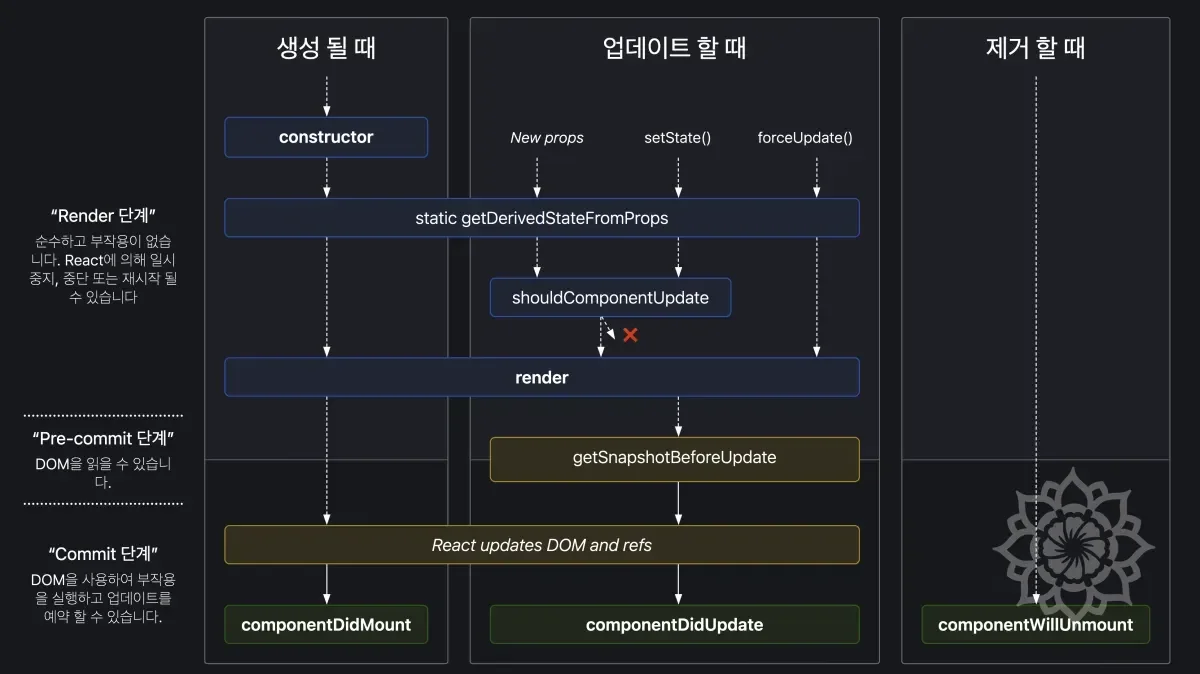
There's an advantage of being able to intervene in state more finely regarding React components, but this advantage also became a disadvantage at the same time.
- It's difficult to reuse stateful logic between components.
- Complex components are hard to understand.
- Classes confuse both people and machines.
Source: React Official Documentation - Hooks Introduction
Besides this, there was also the problem of unnecessary code increasing due to complex lifecycle.
As mentioned in React's Development Philosophy, the React team introduced hooks to solve these problems.
Let's look through code
Problem Through Code - 1
Let's look at the problem based on the Demo code introduced in Motivation.
Here we'll see the differences when using class-based and functional approaches, and how hooks are used.
I will explain based on this code.
The goal here is to change the name "Mary" through my own input on the screen.
Back when functional components weren't as common as now and class was predominant, code was written like this.
If you wanted to use state without using class in this situation, what would you do?
We would naturally mention
useState, but don't forget. This is a story from beforeuseStateappeared, or at that moment.
The same functionality was written in functional code. At this time, we used a hook called useState.
For comparison, I also wrote the class-based code in the Tab. Let's compare the two approaches.
Class-based functions have the following characteristics.
stateis declared as an object. And related elements exist as properties of the object.- In the case of
eventHandler, it must be bound tothisforstateaccess. - To access the value of state, you must use
this.state.name.
On the other hand, when using functional components based on hooks, no complex process is needed.
You can declare state through useState and change state through setState.
A Hook is a function provided by react that lets you hook into react features from your function component.
As mentioned earlier in The Etymology of Hooks, hooks are functions that allow you to use React features in functional components.
useState can also be seen as a function provided by React.
Now, let's think about adding an item called surname.
Can you feel that the functional approach is easier to modify from a DX perspective?
Here, the biggest problem with class-based components is that concerns are not completely separated.
Two states, name and surname, are mixed within the state object.
Problem Through Code - 2
This time, let's look at it with context.
context, it's like kind of like global variables for a subtree so it's useful for things like read the current theme like visual theme or current language that the user is using and it's useful to avoid passing everything through props if you need all components to be able to read some value.
As mentioned in the video, it can be easily expressed as a global variable for a subtree.
In other words, it can also be expressed as global state.
The written code is as above, let's compare class-based and functional.
| Class-based | Functional |
|---|---|
| It's clearly written what process needs to be done. (Imperative) | It's clearly written what is being done. (Declarative) |
| Logic is somewhat complexly intertwined. (nested) | It's described more simply. (flat) |
| State processing logic is included together in the output part. | Output part and state processing logic are more clearly separated. |
Rules of Hooks
Unlike class-based, in functional components state is separated, and you might question how this is possible.
In functional, it's declarative saying what the result will be! and the process isn't clearly specified, so the question is how it works smoothly.
React relies on the order of function calls.
This might sound unfamiliar, but simply put, there are rules that must be followed to use hooks.
- Hooks must only be called at the top level of a component.
- Hooks must only be called inside functional components.
If you don't follow these rules, React may behave unexpectedly.
Calling hooks like useState inside an if statement as above is not allowed.
To prevent this, the React team provides a Lint Plugin.
Lifecycle Management Through Code
Let's look at the lifecycle-related problems covered in Problems Hooks Aim to Solve through code.
The code was modified to change document.title when the component is rendered. (Tab title modification)
In class-based, we used componentDidMount and componentDidUpdate, but in functional, we used useEffect.
useEffect allows you to perform side effects in functional components.
The key point here is that in class-based you had to consider all the lifecycle method names, but in functional you can solve everything with just useEffect.
In other words, the process became very simple by using hooks.
Let's also look at cases where you need to change document.title whenever the component's state changes, like in responsive web.
The key point here is that in class-based, you had to modify multiple places in the code to add logic.
On the other hand, with functional, not only can you manage everything in one place, but you can solve it with just useEffect without having to memorize all lifecycle methods.
At the same time, by creating a useEffect for each element of interest, you can achieve separation of concerns.
Custom Hooks
Functions that utilize React features can be considered hooks.
This is something similar to what was said earlier.
If hooks are similar to functions, can't we implement our own beyond the basic features provided by React?
Hook calls, they are just function calls.
> REACT CONF 2018
Actually, this is what the speaker said when unveiling hooks at REACT CONF 2018.
Separating the internal logic of React components as above, especially separating hooks, is called custom hooks.
By separating like this, you can not only improve the readability of components like separating code into functions, but also improve reusability.
In particular, the advantage is that separation of concerns is achieved more clearly.
Custom hooks must start with use.
There are two reasons for this.
- It's for Lint utilization to automatically check if hooks are being misused.
- It's to avoid confusion with functions in the code within a component and to clearly indicate that this is a hook.
Custom hooks are functions that utilize React's basic hooks depending on the case.
This is to clearly inform other developers that React hooks like useState or useEffect are being used here.
It's to prevent confusion when following the rules mentioned in Rules of Hooks.
Final Comparison Code
The number of lines is similar, but can you feel that concerns are clearly distinguished?
And it also has the reusability to use hooks elsewhere.
Summary
So far, we've learned about React hooks.
The React official documentation also recommends using functional components and hooks.
Nevertheless, class components continue to be supported to guarantee Legacy, so it would be good to keep this in mind.
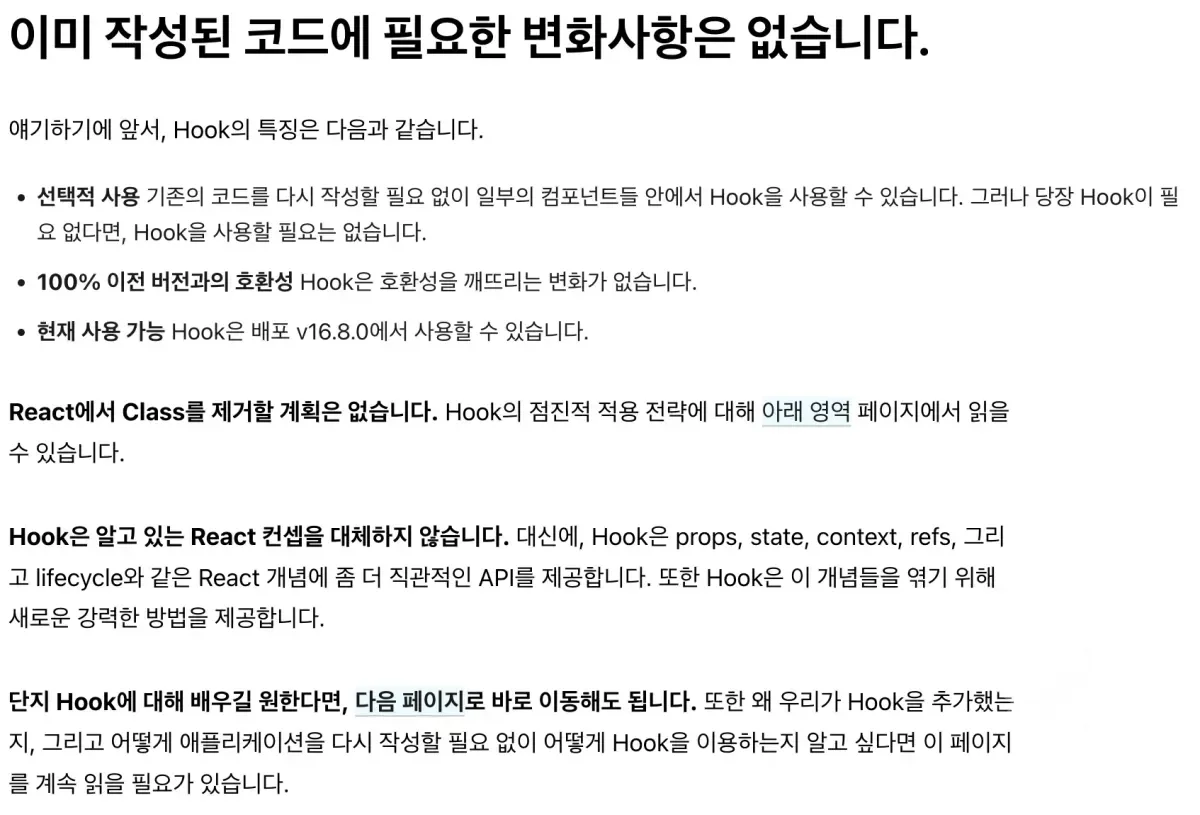
Finally, here's a summary of what we've covered.
| Feature | Class Components | Functional Components (Using Hooks) |
|---|---|---|
| State Management | Managing state using this.state and this.setState | Managing state using useState hook |
| Lifecycle Methods | Using various lifecycle methods like componentDidMount, componentDidUpdate, componentWillUnmount | Managing all lifecycle with just useEffect hook |
| Code Conciseness | Code is somewhat complex due to class declaration, constructor, binding, etc. | Code is cleaner and easier to understand with concise function declarations |
| Reusability | Difficult to reuse state and logic, must use Higher-Order Components (HOC) or render props | Logic and state can be easily reused through custom hooks |
| Readability | Readability may decrease due to this keyword usage and complex structure | Readability improves with clear and intuitive structure |
| Complexity | Components may become complex due to multiple methods and state management within a class | Components become simpler by separating state and effects into separate hooks |
| Separation of Concerns | State management and UI logic are mixed in the same class | Clearly separates state management, side effects, context, etc. using hooks |
this Binding Issue | this binding required in event handlers | No binding issues because this is not used |
| Performance Optimization | Optimization required through separate methods like shouldComponentUpdate | Easy optimization with React.memo, useMemo, useCallback, etc. |
| Test Ease | Testing can be somewhat difficult due to complexity of class methods | Testing is easy as written in pure function form |
| Future-Oriented | Class-based usage is gradually decreasing as functional components and hooks are now mainstream | Aligns with latest React development patterns and receives continuous updates and support |